


A good cup of coffee is the perfect start to any morning, and having the right coffee maker can make all the difference. Proctor Silex is a trusted brand known for its efficient and user-friendly coffee makers. Whether you’re a coffee connoisseur or just someone who enjoys a quick and easy brew, this guide will walk you through how to use a Proctor Silex coffee maker step by step.
We will cover the basic setup, brewing process, cleaning, and maintenance, and even address some frequently asked questions to ensure you get the most out of your Proctor Silex coffee maker.
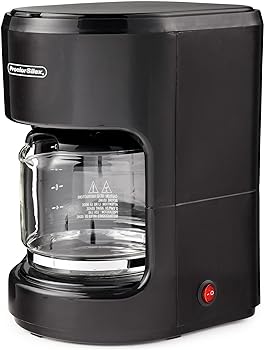
Unboxing and Initial Setup
Before we dive into brewing that perfect cup of coffee, let’s start with the unboxing and initial setup of your Proctor Silex coffee maker.
Step 1: Unboxing
When you unbox your Proctor Silex coffee maker, you’ll typically find the following components:
- Coffee maker unit
- Glass carafe
- Coffee filter basket
- Measuring scoop
- Filter paper
Step 2: Inspecting the Coffee Maker
Carefully inspect the coffee maker to ensure there are no visible damages. If you notice any issues, contact the retailer or the manufacturer for assistance. It’s essential to address these problems before proceeding.
Step 3: Finding a Suitable Location
Choose a suitable location for your coffee maker near a power outlet, as you’ll need this for brewing. Ensure it’s on a stable, level surface that can withstand the heat and potential coffee spills.
Understanding Your Proctor Silex Coffee Maker
To use your Proctor Silex coffee maker effectively, you need to understand its key components and features.
Let’s take a closer look:
Water Reservoir:
This is where you pour the water for brewing your coffee. It typically has a maximum water level mark to prevent overflows.
Filter Basket:
The filter basket holds the coffee grounds and the paper filter.
Carafe:
The glass carafe collects the brewed coffee. It usually comes with a warming plate to keep the coffee hot.
Control Panel:
The control panel contains buttons and settings for operating the coffee maker. These buttons allow you to start and stop the brewing process, set the brewing time, and more.
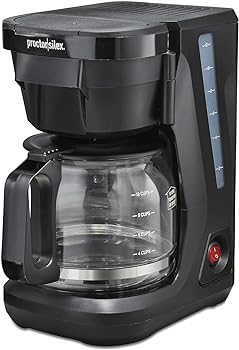
Brewing Coffee with Your Proctor Silex Coffee Maker
Now that you’re familiar with the basic components, let’s get into the process of brewing coffee using your Proctor Silex coffee maker.
Step 1: Prepare the Coffee Maker
- Start by making sure the coffee maker is clean and dry.
Step 2: Add Water
- Open the top lid of the coffee maker to access the water reservoir.
- Use the measuring scoop provided to add the desired amount of coffee grounds into the filter basket.
- If your coffee maker uses a reusable mesh filter, there’s no need for a paper filter. If it doesn’t, place a paper filter in the basket before adding coffee grounds.
Step 3: Add Coffee Grounds
- Carefully pour the water into the water reservoir. Make sure not to overfill beyond the maximum water level mark.
- Close the lid securely.
Step 4: Brew
- Plug in the coffee maker and turn it on.
- Most Proctor Silex coffee makers have a single button for starting the brewing process. Press it, and the machine will start brewing.
Step 5: Collect the Coffee
- The coffee will drip into the glass carafe. Wait for the brewing process to complete.
- Once the brewing is done, turn off the coffee maker.
- Carefully remove the carafe, and your fresh coffee is ready to serve.
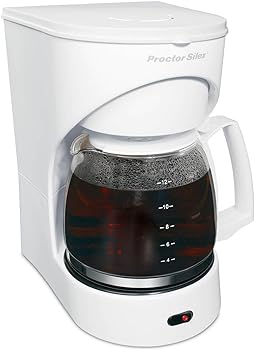
Programming Features
Many Proctor Silex coffee makers come with programmable features that allow you to customize your coffee experience.
Here’s how to use them:
Setting the Time
- To set the time on your coffee maker, locate the clock button on the control panel.
- Press and hold the clock button until the time display starts flashing.
- Use the hour and minute buttons to adjust the time.
- Once the correct time is displayed, release the buttons, and the time will be set.
Auto Brew
- Some models allow you to set a time for your coffee maker to start brewing automatically. This is convenient for having freshly brewed coffee waiting for you in the morning.
- To program the auto-brew feature, find the “Program” or “Auto” button on the control panel.
- Press the button and set the desired time for brewing.
- Make sure you’ve added water and coffee grounds the night before.
- The coffee maker will start brewing at the programmed time.
Keep Warm Feature
- Proctor Silex coffee makers often come with a keep warm feature. This keeps your coffee warm after brewing.
- To activate the Keep Warm feature, press the “Keep Warm” or “Warming Plate” button.
- Your coffee will stay warm on the warming plate for a set period (usually 2 hours). You can change the duration if your model allows it.
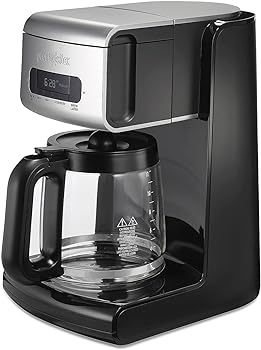
Cleaning and Maintenance
To ensure your Proctor Silex coffee maker continues to produce great-tasting coffee, it’s essential to regularly clean and maintain it.
Here’s how to do it:
Step 1: Regular Cleaning
- After each use, unplug the coffee maker and allow it to cool.
- Remove the filter basket, carafe, and any remaining coffee grounds.
- Wash the filter basket, carafe, and the coffee maker’s lid and reservoir in warm, soapy water.
- Rinse thoroughly and allow all parts to air dry.
Step 2: Descaling
- Over time, mineral deposits can build up in your coffee maker, affecting its performance and the taste of your coffee.
- Descaling is the process of removing these deposits.
- To describe your coffee maker, follow the manufacturer’s recommendations. This usually involves running a solution of equal parts water and white vinegar through the coffee maker, followed by several cycles of plain water to remove any residual vinegar taste.
Step 3: Cleaning the Warming Plate
- The warming plate can accumulate coffee stains and residue over time.
- To clean it, unplug the coffee maker and allow it to cool.
- Wipe the warming plate with a damp cloth or sponge.
- If the stains are stubborn, use a mixture of baking soda and water to gently scrub the plate.
Step 4: Replacing the Water Filter (if applicable)
- Some Proctor Silex coffee makers come with water filters to improve the taste of your coffee.
- If your coffee maker has a water filter, make sure to replace it as recommended in the user manual. Typically, this is every two months or so.
Step 5: Exterior Cleaning
- Wipe down the exterior of the coffee maker with a damp cloth to remove any coffee splatters or fingerprints.
Conclusion
Using a Proctor Silex coffee maker is a straightforward process that can result in a perfect cup of coffee. By following the steps outlined in this guide, understanding your coffee maker’s features, and keeping it clean and well-maintained, you can enjoy a consistent and satisfying coffee experience every day.
Whether you prefer a strong, dark roast or a milder brew, your Proctor Silex coffee maker can be adjusted to meet your coffee preferences. Additionally, with the programming features, you can wake up to the aroma of freshly brewed coffee or enjoy the convenience of having your coffee maker start brewing while you’re still getting ready in the morning.
Remember to maintain your coffee maker regularly, follow proper cleaning procedures, and descale it when necessary to ensure it continues to operate at its best.
With this comprehensive guide, you should be well-equipped to make the most of your Proctor Silex coffee maker, troubleshoot common issues, and enjoy your daily coffee rituals to the fullest.
You Might Be Interested In
- How To Use Cuisinart Coffee Maker With Grinder?
- How To Clean Oxo Coffee Maker?
- How Do You Use A Hamilton Beach Coffee Maker?
- How To Use Smeg Coffee Maker?
- How To Program Cuisinart Coffee Maker?
Frequently Asked Questions
My coffee tastes weak. What can I do to make it stronger?
If your coffee tastes weak, you can make it stronger by using the following tips:
- Increase the amount of coffee grounds you use.
- Use a darker roast coffee.
- Adjust the water-to-coffee ratio to your preference.
- Ensure your coffee grounds are fresh and not stale.
Why is my coffee maker not turning on?
If your coffee maker is not turning on, try the following:
- Make sure it’s properly plugged in.
- Check the power outlet to ensure it’s working.
- Examine the power cord for any visible damage.
- Confirm that the water reservoir is properly seated and the lid is closed securely.
Can I use ground coffee with a Proctor Silex coffee maker that uses pods?
Proctor Silex offers coffee makers compatible with both ground coffee and coffee pods. If your coffee maker is designed for pods, make sure to use compatible pods. If it’s designed for ground coffee, avoid using pods, as they may not work well with that model.
How do I set the auto-brew feature on my Proctor Silex coffee maker?
To set the auto-brew feature, follow these general steps:
- Find the “Program” or “Auto” button on the control panel.
- Press the button and set the desired time for brewing.
- Ensure you’ve added water and coffee grounds the night before.
- The coffee maker will start brewing at the programmed time.
Please consult your specific model’s user manual for precise instructions, as different models may have variations in programming features.
Can I use the warming plate to reheat my coffee later?
The warming plate on your Proctor Silex coffee maker is designed to keep coffee warm after brewing, not to reheat it. If your coffee has cooled down and you want it hot again, it’s best to pour it into a microwave-safe container and reheat it in the microwave.