



Cuisinart coffee makers are renowned for their quality and convenience. Whether you’re a coffee aficionado or simply need your morning caffeine fix, learning how to operate a Cuisinart coffee maker can greatly enhance your coffee brewing experience.
In this comprehensive guide, we’ll provide you with a step-by-step tutorial on how to use your Cuisinart coffee maker effectively, along with answers to five frequently asked questions to help troubleshoot common issues.
Getting Started
Unboxing and Setup
When you first receive your Cuisinart coffee maker, carefully unbox it and inspect the contents. In the package, you should find the coffee maker unit, a water reservoir, a coffee filter basket, and a glass carafe. Make sure all components are included.
To set up your coffee maker:
- Place it on a clean, flat, and level surface near an electrical outlet.
- Remove any packaging materials and stickers from the machine.
- Inspect the power cord for any damage or defects.
- Ensure the water reservoir and carafe are clean and free from any residue.
Overview of Cuisinart Coffee Maker Parts
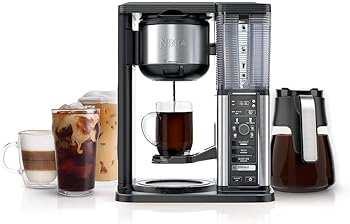
Before diving into the operation, it’s essential to familiarize yourself with the key components of your Cuisinart coffee maker:
1. Water Reservoir:
This is where you pour the water you’ll use for brewing. It’s usually located at the rear of the coffee maker and has water level markings to indicate the desired water quantity.
2. Coffee Filter Basket:
This is where you place your coffee grounds or coffee filter. It fits beneath the brew head and has a swing-out design for easy access.
3. Brew Head:
This is where the water is dispensed over the coffee grounds.
4. Carafe:
The glass carafe is where your freshly brewed coffee is collected.
5. Control Panel:
Your Cuisinart coffee maker will have various buttons and settings on the control panel, which we’ll explore in detail shortly.
Preparing Your Coffee Maker
Now that you’ve set up your coffee maker, it’s time to prepare it for brewing:
1. Water Reservoir
- Lift the water reservoir off the coffee maker. It’s usually detachable for ease of filling.
- Using the water level markings on the reservoir, add the desired amount of water for your coffee. Be sure not to exceed the maximum capacity.
- Carefully reattach the water reservoir to the coffee maker.
2. Coffee Filter
- Open the coffee filter basket by swinging it out from underneath the brew head.
- Depending on your preference, you can use either a paper coffee filter or a reusable mesh filter. Place the filter into the basket.
- If you’re using a paper filter, make sure to fold the crimped edges to ensure it fits securely.
3. Coffee Grounds
- Measure the coffee grounds based on your desired coffee strength. A standard guideline is 1 to 2 tablespoons of coffee grounds for every 6 ounces of water. Adjust the quantity as per your taste.
- Add the measured coffee grounds to the filter in the coffee filter basket.
With your coffee maker now prepared, you’re ready to start brewing your favorite coffee.
Brewing Your Coffee
1. Selecting Brew Strength
Most Cuisinart coffee makers come with options to choose the strength of your brew. Common options include Regular, Bold, and 1-4 cups. The ‘Regular’ setting provides a standard strength, while ‘Bold’ results in a stronger brew. The ‘1-4 cups’ option is ideal for making smaller batches of coffee.
To select your preferred brew strength:
- Locate the brew strength button on the control panel.
- Press the button to cycle through the available options until your desired strength is displayed on the LED screen.
2. Setting Auto-On and Auto-Off Times
Cuisinart coffee makers often come equipped with programmable features, allowing you to set a specific time for the coffee maker to start brewing (Auto-On) and a time for it to automatically turn off (Auto-Off).
To set the Auto-On and Auto-Off times:
- Find the Timer button on the control panel.
- Press the Timer button, and the LED screen should display the time settings.
- Use the Hour and Minute buttons to set the desired Auto-On time.For example, if you want your coffee to start brewing at 7:00 AM, set the timer accordingly.
- After setting the Auto-On time, you can proceed to set the Auto-Off time using the same process.For example, if you want the coffee maker to turn off at 8:00 AM, set the Auto-Off time accordingly.
- Once you’ve set both the Auto-On and Auto-Off times, press the Timer button again to activate the timer function. The coffee maker will start brewing at the designated time.
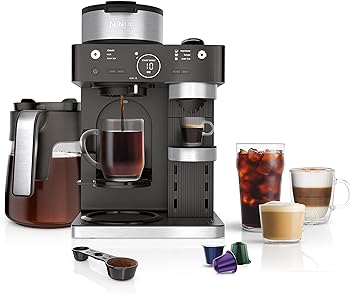
3. Brewing Process
With your coffee maker prepared and the settings adjusted, it’s time to start brewing:
- Ensure the glass carafe is correctly placed under the brew head to collect the brewed coffee.
- Press the “Brew” button on the control panel to initiate the brewing process. Your coffee maker will start heating the water and dispensing it over the coffee grounds in the filter basket.
- During the brewing process, you can observe the coffee level in the carafe rising as the coffee is collected.
- Once the brewing is complete, the coffee maker will automatically shut off, ensuring your coffee doesn’t overheat.
Congratulations! You’ve successfully brewed your first cup of coffee using your Cuisinart coffee maker.
Maintaining Your Cuisinart Coffee Maker
Proper maintenance is essential to keep your coffee maker functioning optimally and to ensure the quality of your coffee remains consistent.
1. Cleaning the Machine
Regular cleaning helps prevent the buildup of coffee residue and mineral deposits.
Follow these steps for cleaning your Cuisinart coffee maker:
- Turn off and unplug the coffee maker.
- Remove the coffee filter basket and empty any used coffee grounds.
- Wash the coffee filter basket and carafe with warm, soapy water. Rinse them thoroughly and let them air dry.
- Wipe down the exterior of the coffee maker with a damp cloth to remove any coffee splatters or residue.
- Periodically, clean the water reservoir to prevent mineral buildup. Use a mixture of equal parts water and white vinegar and run it through the coffee maker as if you were brewing coffee. Then, rinse the reservoir thoroughly with clean water.
- Descaling your coffee maker, which we’ll discuss in the next section, is essential to prevent mineral buildup within the machine.
2. Descaling Your Coffee Maker
Descaling is the process of removing mineral deposits, such as calcium and lime, that can accumulate within your coffee maker. Over time, these deposits can affect the machine’s performance and the taste of your coffee.
To describe your Cuisinart coffee maker:
- Mix a solution of equal parts white vinegar and water.
- Fill the water reservoir with the vinegar-water solution.
- Place an empty coffee filter or a reusable filter in the coffee filter basket.
- Start the coffee maker and allow it to brew as usual.
- Discard the brewed solution and thoroughly rinse the water reservoir.
- Fill the reservoir with clean water and run a brewing cycle without coffee grounds to rinse out any remaining vinegar.
- Repeat the rinse cycle as needed to ensure no vinegar taste remains.
Descaling frequency may vary depending on the hardness of your water. For most users, descaling every 1-2 months is sufficient.
Troubleshooting Common Issues
Even with proper maintenance, you may encounter some issues with your Cuisinart coffee maker.
Here are solutions to five common problems:
1. Coffee Maker Won’t Turn On
- Check that the coffee maker is correctly plugged into a working electrical outlet.
- Ensure the power cord is in good condition and securely connected.
- Confirm that the power switch, if present, is in the “on” position.
2. Water Leakage
- Ensure the water reservoir is correctly seated on the coffee maker and properly filled.
- Check that the coffee filter basket is firmly in place.
- Verify that the carafe is properly positioned under the brew head to collect the coffee.
3. Coffee Tastes Bitter
- Adjust the coffee-to-water ratio. Too much coffee can result in a bitter taste.
- Use clean, filtered water to avoid any unpleasant flavors from tap water.
- Make sure the coffee grounds are fresh and stored in an airtight container.
4. Slow Brewing
- Descaling the coffee maker can resolve slow brewing caused by mineral buildup.
- Check for clogs in the brew head or filter basket and clean them if necessary.
5. Grounds in Your Coffee
- Ensure the coffee filter is correctly placed in the filter basket and not torn.
- Check the coffee-to-water ratio, as an incorrect ratio can result in grounds in your coffee.
- If using a reusable filter, inspect it for damage or fine cracks that may allow grounds to pass through.
If you continue to experience issues, consult the user manual that came with your Cuisinart coffee maker for specific troubleshooting guidance.
Conclusion
In this comprehensive guide, we’ve walked you through the step-by-step process of operating your Cuisinart coffee maker effectively. From unboxing and setup to brewing your coffee and troubleshooting common issues, you now have a solid understanding of how to make the most of your coffee maker.
By following the instructions provided and maintaining your coffee maker, you can consistently enjoy the perfect cup of coffee that suits your taste preferences. Whether you prefer a robust, bold brew or a milder one, your Cuisinart coffee maker is a versatile appliance that can cater to your coffee needs.
Now, go ahead and put your knowledge to use, brewing your favorite coffee with ease and confidence!
You Might Be Interested In
- How To Use A Cuisinart Coffee Maker?
- How To Use Keurig Coffee Maker Single Cup?
- How To Use De Longhi Espresso Machine?
- How To Clean Bonavita Coffee Maker?
- How To Set Time On Cuisinart Coffee Maker?
Frequent Asked Questions
How do I set the timer for auto-brewing?
To set the timer for auto-brewing, press the Timer button on the control panel, use the Hour and Minute buttons to set your desired start time, and then press the Timer button again to activate the timer.
Can I use pre-ground coffee, or do I need to grind my own beans?
You can use pre-ground coffee or grind your own beans, depending on your preference. Cuisinart coffee makers are compatible with both.
Why is my coffee maker making strange noises during brewing?
Unusual noises during brewing may be caused by mineral buildup or clogs. Try descaling your coffee maker and cleaning the brew head and filter basket.
What’s the difference between the various brew strengths?
The different brew strengths, such as Regular and Bold, adjust the brewing time and water flow to produce coffee with varying levels of strength and flavor. “Regular” results in a standard brew, while “Bold” produces a stronger coffee. The “1-4 cups” option is designed for smaller batches.
Is it safe to leave the coffee maker unattended while brewing?
Cuisinart coffee makers are equipped with an automatic shut-off feature to ensure safety. It is generally safe to leave the machine unattended during brewing, as it will turn off once the brewing process is complete.