



Cuisinart coffee makers are known for their quality and convenience, making your morning coffee routine a breeze. One of the essential features of these machines is the built-in clock, which allows you to program your coffee maker to start brewing at a specific time.
Setting the clock on your Cuisinart coffee maker is a straightforward process, but it can vary depending on the model you own.
In this comprehensive guide, we will provide step-by-step instructions for setting the clock on different Cuisinart coffee maker models. Whether you’re a seasoned Cuisinart user or just getting started, this article will help you make the most of your coffee maker’s features.
How to Set the Clock on a Cuisinart Coffee Maker
Cuisinart offers a variety of coffee maker models, each with its own unique set of features and functionalities. Below, we’ll provide instructions for setting the clock on three popular Cuisinart coffee maker models: Single-Serve, Programmable Drip Coffee Maker, and Cuisinart Grind & Brew.
Setting the Clock on a Single-Serve Cuisinart Coffee Maker
- Plug in your Single-Serve Cuisinart coffee maker to a power source and make sure it’s turned on.
- Locate the clock or time-setting button on your machine. This button is typically labeled as “Clock” or “Time.”
- Press and hold the clock button for a few seconds until the clock display starts flashing.
- Use the hour and minute buttons to adjust the time to the current time. Most Single-Serve Cuisinart coffee makers use a 12-hour format.
- Once you’ve set the correct time, press the clock button again to save the time and exit the clock-setting mode.
- Your Single-Serve Cuisinart coffee maker’s clock is now set and ready to use.

Setting the Clock on a Programmable Drip Coffee Maker
- Plug in your Programmable Drip Cuisinart coffee maker to a power source and make sure it’s turned on.
- Look for the “Clock” or “Time” button on the control panel. Press it once to access the clock-setting mode.
- Use the hour and minute buttons to adjust the time to the current time, following the 12-hour format.
- After setting the correct time, press the “Clock” or “Time” button again to save the time and exit the clock-setting mode.
- Your Programmable Drip Cuisinart coffee maker’s clock is now correctly set.
Setting the Clock on a Cuisinart Grind & Brew Coffee Maker
- Plug in your Cuisinart Grind & Brew coffee maker to a power source and turn it on.
- Find the “Program” or “Clock” button on the control panel, usually located near the clock display. Press this button to enter the clock-setting mode.
- Use the hour and minute buttons to adjust the time to the current time, ensuring that you choose the appropriate AM or PM setting in the 12-hour format.
- Once the correct time is set, press the “Program” or “Clock” button again to save the time and exit the clock-setting mode.
- Your Cuisinart Grind & Brew coffee maker is now ready to brew your coffee at your specified time.
Troubleshooting Tips
If you encounter any issues while setting the clock on your Cuisinart coffee maker or if your coffee maker’s clock malfunctions, consider the following troubleshooting tips:
Check the Power Source:
Ensure that your coffee maker is properly plugged into a functioning power source. Without power, the clock and other settings cannot be adjusted.
Read the User Manual:
Your coffee maker’s user manual is a valuable resource for troubleshooting and understanding its features. Refer to it for specific instructions and solutions to common problems.
Inspect the Control Panel:
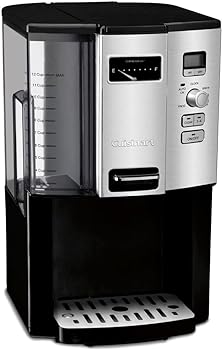
If the display or control panel is unresponsive, check for any visible damage, loose connections, or obstructions. If you notice any issues, contact Cuisinart customer support or a qualified technician.
Reset the Coffee Maker:
Some issues can be resolved by performing a factory reset on your coffee maker. The process for resetting your machine will be outlined in the user manual.
Contact Customer Support:
If you’ve tried the above steps and still encounter problems, don’t hesitate to contact Cuisinart’s customer support for professional assistance and guidance.
Conclusion
Setting the clock on your Cuisinart coffee maker is a relatively simple process that enhances the convenience and functionality of your machine. Whether you own a Single-Serve Cuisinart coffee maker, a Programmable Drip Coffee Maker, or a Cuisinart Grind & Brew Coffee Maker, the instructions provided in this guide will help you get your clock up and running.
Additionally, we’ve addressed common questions and troubleshooting tips to ensure that you can make the most of your Cuisinart coffee maker. The ability to schedule your coffee brewing time and combine it with other programmable features can significantly improve your daily coffee experience.
Remember to consult your coffee maker’s user manual for model-specific details and contact Cuisinart’s customer support or a professional technician if you encounter any persistent issues. Enjoy the convenience of perfectly timed coffee with your Cuisinart coffee maker.
You Might Be Interested In
- How To Clean Krups Coffee Maker?
- How To Use Black And Decker Coffee Maker?
- How To Make Espresso In Ninja Coffee Maker?
- How To Set Time On Cuisinart Coffee Maker?
- How to Choose the Best Handheld Mini Milk Frother for Your Needs
Frequently Asked Questions
Can I set the clock without turning on the coffee maker?
Yes, you can set the clock on most Cuisinart coffee makers without turning on the coffee maker itself. Simply plug in the coffee maker and follow the instructions outlined in the relevant section for your model. Typically, you’ll access the clock-setting mode by pressing a dedicated “Clock” or “Time” button on the control panel.
Why is it important to set the clock on my coffee maker?
Setting the clock on your Cuisinart coffee maker offers several benefits. First, it allows you to program your coffee maker to start brewing at a specific time, ensuring that you wake up to freshly brewed coffee. Additionally, the clock is often used in conjunction with other features, such as auto shut-off and cleaning reminders, to enhance the convenience and efficiency of your coffee maker.
What if my Cuisinart coffee maker’s display is not functioning properly?
If your coffee maker’s display is not functioning correctly or is unresponsive, there may be an issue with the control panel or the machine’s internal electronics. In this case, it’s advisable to consult your coffee maker’s user manual for troubleshooting steps. You can also contact Cuisinart’s customer support for further assistance or consider seeking professional repair services.
Does setting the clock affect the brewing process?
Setting the clock on your Cuisinart coffee maker does not directly impact the brewing process. It primarily serves the purpose of scheduling when your coffee maker will automatically start brewing. However, some Cuisinart models offer the option to program brew strength, temperature, and other settings, which can be used in conjunction with the clock to customize your coffee brewing experience.
Can I set different times for weekdays and weekends?
The ability to set different brewing times for weekdays and weekends may vary depending on your specific Cuisinart coffee maker model. Some advanced models with programmable settings allow you to set different schedules for different days of the week, while others may have a single programmable time. Refer to your coffee maker’s user manual to determine if this feature is available and how to use it.