


Braun coffee makers are known for their exceptional brewing quality and user-friendly features. Setting the clock on your Braun coffee maker is a simple but essential task that ensures your coffee is ready when you need it. In this comprehensive guide, we will walk you through the step-by-step process of setting the clock on your Braun coffee maker, regardless of the specific model you own.
We understand that the process may seem a bit tricky at first, which is why we’re here to provide detailed instructions and troubleshooting tips. Additionally, we will address five frequently asked questions (FAQs) that many Braun coffee maker users encounter. By the end of this article, you’ll have a clear understanding of how to set the clock and make the most of your Braun coffee maker.
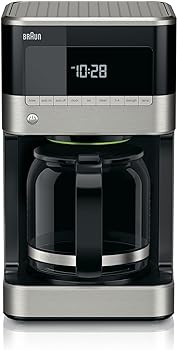
Unboxing and Preparation
Before you can set the clock on your Braun coffee maker, you need to prepare the machine and familiarize yourself with its components.
This section will guide you through the initial steps to ensure a smooth setup:
1. Unbox your Braun coffee maker:
Carefully unpack your coffee machine, making sure all included components are present and undamaged. Typical components may include the coffee machine itself, a carafe, a water reservoir, a filter basket, and any accessories that come with your specific model.
2. Clean your coffee machine:
It’s essential to start with a clean machine. Refer to the user manual for specific cleaning instructions tailored to your model. Common cleaning steps include rinsing the water reservoir, wiping down the exterior, and cleaning the carafe.
3. Position your coffee maker:
Place your Braun coffee maker on a flat, stable surface near an electrical outlet. Ensure that there is enough clearance for the power cord and that the machine is within reach of your coffee supplies.
4. Read the user manual:
To understand your specific model’s features and functions, consult the user manual provided by Braun. Familiarizing yourself with the manual is crucial for setting the clock and using your coffee machine effectively.
Setting the Clock
Now that your coffee machine is unboxed and prepared, it’s time to set the clock. Braun coffee makers come in various models, and the process may differ slightly from one to another.
However, the following general steps will guide you through the clock-setting process:
1. Plug in your coffee maker:
Connect your coffee machine to a power source. Ensure the power cord is securely inserted into an electrical outlet.
2. Locate the control panel:
On most Braun coffee makers, the control panel is situated on the front of the machine, near the top. This is where you’ll find the buttons and displays necessary for setting the clock.
3. Access the clock-setting mode:
To set the clock, you’ll typically need to enter a clock-setting mode. Depending on your model, you may need to press and hold a specific button or sequence of buttons. Refer to your user manual to find the exact procedure for your model.
4. Adjust the hours:
In clock-setting mode, you can now adjust the hours. Use the designated buttons to increase or decrease the hour value until it reflects the current time.
5. Set the minutes:
After configuring the hours, navigate to the minutes. Adjust the minutes using the designated buttons until they match the current time.
6. Confirm the time:
After setting the hours and minutes, you will need to confirm the time. The process for confirmation may vary among models, but it usually involves pressing a specific button to save your settings.
7. Exit clock-setting mode:
To complete the process, exit the clock-setting mode. This typically involves pressing the same button or sequence of buttons used to enter the mode. Your Braun coffee maker should now display the correct time on its clock.
It’s important to note that the above steps provide a general guideline for setting the clock on Braun coffee makers. The specific buttons and sequence may differ from one model to another, so always refer to your user manual for model-specific instructions.

Common Issues and Troubleshooting
Setting the clock on your Braun coffee maker is usually straightforward, but occasionally, you may encounter some challenges. In this section, we will address common issues and offer troubleshooting tips to ensure your clock is set correctly.
1. Display not responding:
- Ensure the coffee machine is correctly plugged into a working electrical outlet.
- Check if there’s a power switch that needs to be turned on.
- If the display remains unresponsive, consult your user manual for specific troubleshooting steps related to your model.
2. Difficulty entering clock-setting mode:
- Review the user manual to confirm the correct button or sequence for entering clock-setting mode.
- Ensure you’re pressing and holding the required button(s) for a sufficient duration.
3. Incorrect time displayed:
- Double-check that you’ve set the hours and minutes correctly.
- Make sure you’ve confirmed the time settings as per your model’s instructions.
- If the time is still incorrect, consider resetting the clock and starting the process from the beginning.
4. Power interruptions:
- If there’s a power outage, the clock on your coffee maker may reset. In such cases, you’ll need to re-enter the correct time.
5. Clock-setting button not working:
- If a specific button you need to use for clock setting is unresponsive, contact Braun’s customer support for guidance and potential repairs.
- If you encounter persistent issues despite troubleshooting, it may be necessary to seek professional assistance or refer to the warranty information for your Braun coffee maker.
Conclusion
Setting the clock on your Braun coffee maker is a simple yet important task that ensures your coffee is brewed when you need it. With the step-by-step instructions provided in this guide, along with troubleshooting tips and answers to common questions, you can confidently set the clock on your Braun coffee maker and enjoy your daily coffee ritual without any hassle.
You Might Be Interested In
- How to Use and Clean a Mini Milk Frother with Style
- How To Work A Cuisinart Coffee Maker?
- How to Program a Cuisinart Coffee Maker 14-Cup
- How To Make Espresso In Ninja Coffee Maker?
- How To Use Keurig Coffee Maker Single Cup?
Frequently Asked Questions
How often should I set the clock on my Braun coffee maker?
The clock on your Braun coffee maker should retain its settings unless there’s a power outage or you unplug the machine. In normal circumstances, you should only need to set the clock once.
What should I do if I lose my user manual?
If you’ve misplaced your user manual, you can usually find a digital copy on the Braun website. Simply visit the support section and search for your model to access a downloadable PDF manual.
My Braun coffee maker has a 24-hour format. How can I change it to AM/PM?
Some Braun coffee makers may only offer a 24-hour time format. Unfortunately, many models do not provide the option to switch to the AM/PM format. You may need to adapt to the 24-hour format in such cases.
Can I set the clock in advance to have my coffee maker start brewing at a specific time?
Braun coffee makers typically do not have a timer feature to schedule brewing in advance. You will need to start the brewing process manually when you’re ready for a fresh cup of coffee.
What if I see a blinking clock symbol on my Braun coffee maker display?
A blinking clock symbol typically indicates that the clock is not set or has been reset. Follow the steps in Section 2 of this article to set the clock and stop the blinking.