


Bunn coffee makers are renowned for their exceptional brewing capabilities and durability. However, like any coffee machine, they require regular maintenance to ensure they continue delivering great-tasting coffee.
One essential maintenance task is emptying the Bunn coffee maker. Regularly emptying your coffee maker helps maintain the machine’s performance, keeps it clean, and ensures the coffee it brews is consistently delicious.
In this comprehensive guide, we will walk you through the step-by-step process of emptying a Bunn coffee maker. Whether you have a home Bunn coffee maker or a commercial model, the principles for emptying are similar. We’ll cover the essential steps to ensure that your Bunn coffee maker remains in top condition and is ready to brew your favorite coffee. Additionally, we’ll address five frequently asked questions about this process to provide you with a comprehensive understanding.

How To Empty A Bunn Coffee Maker
Step 1: Turn Off the Bunn Coffee Maker
Before attempting to empty your Bunn coffee maker, the first step is to ensure it’s powered off and unplugged. This safety precaution is vital to prevent any accidental spills or burns during the emptying process.
Here’s how to do it:
- Unplug the coffee maker from the electrical outlet to ensure there’s no power supply to the machine.
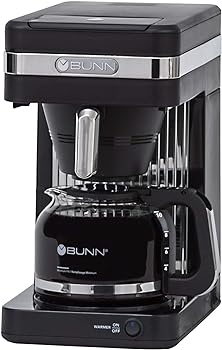
- Turn off the warming plate or burner. This is usually done by flipping a switch or pressing a button on the machine.
- Allow the Bunn coffee maker to cool down if it has been brewing recently. This will minimize the risk of hot coffee or water splashing when you begin emptying it.
Step 2: Remove the Coffee Pot and Filter Basket
Once the coffee maker is safely powered off, it’s time to remove the coffee pot and filter basket. These components need to be taken out before you can proceed with emptying the machine.
Here’s how to do it:
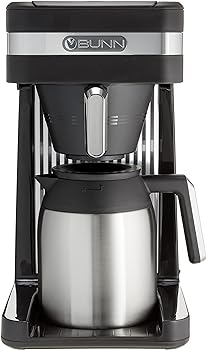
- Carefully lift the coffee pot from the warming plate. Be cautious as it may still contain hot coffee.
- Set the coffee pot aside to cool. If your coffee pot has a lid, remove it to aid in cooling.
- Open the top lid of the Bunn coffee maker to access the filter basket.
- Gently lift the filter basket, which holds the used coffee grounds and the filter. Ensure the filter basket is empty and clean, and place it aside for now.
Step 3: Dispose of Coffee Grounds and Filters
With the coffee pot and filter basket removed, you can now dispose of the used coffee grounds and filters. Proper disposal is essential for keeping your coffee maker clean and ensuring it functions correctly.
Follow these steps for disposal:
- Empty the used coffee grounds from the filter basket into your compost bin or trash. If you have a garbage disposal, this is a convenient place to dispose of the grounds.
- If you use a paper coffee filter, remove it from the filter basket and discard it in your trash. Alternatively, if you use a reusable coffee filter, rinse it under running water to remove any remaining grounds. Let it air dry for future use.
- It’s a good practice to periodically clean the filter basket to prevent any buildup of coffee oils or residue. You can do this by washing it with warm, soapy water and rinsing thoroughly.
Step 4: Empty the Water Reservoir
To maintain the quality and cleanliness of your Bunn coffee maker, it’s essential to regularly empty the water reservoir. Stale water can affect the taste of your coffee and may lead to mineral deposits.
Here’s how to empty the water reservoir:
- Lift the lid of the coffee maker to access the water reservoir.
- Pour any remaining water from the reservoir into your sink or a container. Ensure the water is cold to avoid burns.
- Inspect the reservoir for any mineral deposits or scale buildup. If you notice any, you may want to clean the reservoir with a mixture of water and white vinegar to remove the deposits.
- Rinse the water reservoir thoroughly with cold water to ensure it’s clean and free from any cleaning solution or vinegar residue.
- Allow the reservoir to air dry completely before placing it back in the coffee maker.
Step 5: Wipe Down the Exterior
Maintaining the exterior cleanliness of your Bunn coffee maker is essential not only for aesthetics but also for hygiene. Coffee spills and stains can accumulate over time, so it’s a good idea to regularly wipe down the machine.
Here’s how to do it:
- Use a damp cloth or sponge to wipe the exterior surfaces of the coffee maker. Ensure it’s not dripping wet to avoid water damage to the internal components.
- Pay special attention to any areas where coffee or water may have splashed or dripped, such as the warming plate or the coffee pot’s drip spout.
- For stubborn stains or dried coffee residue, you can use a mild dish soap on the damp cloth. However, be sure to rinse thoroughly to remove any soap residue.
- Dry the exterior with a clean, dry cloth or paper towel to prevent water spots.
Conclusion
Regularly emptying and cleaning your Bunn coffee maker is crucial for maintaining its performance and ensuring the quality of your coffee. By following the step-by-step guide provided in this article, you can keep your coffee maker in top condition and enjoy consistently delicious coffee.
Additionally, addressing common FAQs regarding Bunn coffee maker maintenance can help you troubleshoot any issues that may arise. With proper care and maintenance, your Bunn coffee maker will continue to be a reliable source of your daily caffeine fix.
You Might Be Interested In
- How to Use a Single Use Milk Frother for Quick Frothing
- How To Descale Smeg Coffee Maker?
- How To Clean Mixpresso Coffee Maker?
- How To Set Clock On Cuisinart Coffee Maker?
- How To Use Cuisinart Coffee Maker With Grinder?
Frequently Asked Questions
Can I use a dishwasher to clean the coffee pot and filter basket?
While some Bunn coffee pots and filter baskets are dishwasher safe, it’s essential to check the manufacturer’s instructions for your specific model. Even if they are dishwasher safe, washing them by hand is often recommended to extend their lifespan. Dishwashers can be harsh on certain materials and may lead to premature wear and tear.
How often should I clean the coffee maker’s water reservoir?
It’s recommended to clean the water reservoir of your Bunn coffee maker at least once a month. However, if you notice a significant mineral buildup or changes in the taste of your coffee, more frequent cleaning may be necessary. Regular cleaning helps prevent mineral deposits and keeps your coffee tasting fresh.
Can I use a descaling solution to clean the coffee maker?
Yes, descaling solutions can be used to remove mineral deposits and scale buildup in your Bunn coffee maker. Follow the manufacturer’s instructions for the specific descaling solution you choose. It’s essential to rinse the machine thoroughly after descaling to remove any residual solution and prevent it from affecting the taste of your coffee.
Is it necessary to clean the internal components of the coffee maker?
The internal components of a Bunn coffee maker are generally self-cleaning due to the way the machine is designed. However, it’s recommended to follow a routine cleaning schedule to maintain optimal performance. If you encounter any issues with the machine’s brewing speed or quality, you may want to contact Bunn customer support or consult the user manual for troubleshooting guidance.
What is the best way to prevent coffee stains on the warming plate?
To prevent coffee stains on the warming plate, it’s essential to wipe it clean after each use. Coffee residue can become sticky and difficult to remove if left to dry. Using a damp cloth or sponge immediately after brewing can help keep the warming plate clean. If there are persistent stains, a mixture of mild dish soap and water can be used to clean the warming plate.